

The strongest reason to test an Image to Video AI platform is not novelty. It is leverage. Many creators, marketers, and small teams already have images that solve the hardest creative questions: framing, subject placement, tone, styling, and color direction. What they often lack is a practical way to turn those approved visuals into moving content without reopening the entire production process. In that sense, image-to-video tools are less about replacing creative work and more about extending the useful life of work that already exists.
That distinction matters because the market is now crowded with platforms that sound similar on the surface. They all promise motion, speed, and AI assistance. But once you look at them through the lens of real workflow, the differences become clearer. Some platforms are built for quick image-led conversion. Some feel closer to a broader creative lab. Some prioritize template-driven social output, while others seem more comfortable serving users who want cinematic experiments. A useful comparison therefore has to go beyond hype and ask a simpler question: which platform makes the best use of the image you already have?
My own way of thinking about this category has changed over time. At first, image-to-video looked like a convenience feature. Now it feels more like an operational layer in content production. A still visual no longer has to remain static just because the team lacks a video editor or the time for a full shoot. The right platform can turn a single image into multiple motion variants, each adapted to a different channel, tone, or audience. That is why a ranking of ten platforms is more helpful than a single recommendation. The real task is matching a tool to the job.
A Better Standard For Comparing Ten Platforms
Most platform roundups stay too close to feature language. They compare output claims, model names, and visual buzzwords. Those things matter, but they are not the most reliable way to choose a tool.
The Best Test Starts With Workflow Friction
If a platform requires too much setup before the first usable result, it loses value for everyday creators. A good image-to-video tool should shorten the path from source image to usable clip. That does not mean every tool must be minimal. It means the complexity should feel justified.
Source Images Should Remain Central Assets
A platform becomes more useful when it treats the uploaded image as the foundation of the creative result. In practical work, this is often what users need. They are not starting from a blank page. They already have a visual asset with purpose.
Motion Direction Must Stay Understandable
The strongest tools let users describe movement in ordinary language. A prompt about camera push, subject movement, atmosphere, or pacing should be enough to get started. If the control model is too abstract, adoption slows down.
Repeat Use Is More Important Than One Good Demo
One impressive output can attract attention, but repeated usefulness is what makes a platform worth keeping. The platforms ranked highest here are the ones that seem more likely to fit repeat business, creative, and publishing needs.
The Top Ten Image To Video Platforms This Year
Below is a ranking built around workflow usefulness, accessibility, and likely fit for image-led motion tasks.
| Rank | Platform | Best Match | Core Strength | Main Limitation |
| 1 | Image2Video | Fast image-led motion creation | Clear and direct workflow | Less focused on deep post-production |
| 2 | Runway | Advanced creators and teams | Broad creative environment | Can feel heavy for simple tasks |
| 3 | Pika | Social-first creators | Quick experimentation | Some results lean playful |
| 4 | Luma Dream Machine | Cinematic concept work | Strong sense of atmosphere | Output consistency can vary |
| 5 | Kling | Ambitious visual creators | Visually bold motion | Often requires more iteration |
| 6 | Adobe Firefly | Brand-oriented teams | Familiar design ecosystem | Best fit for existing Adobe users |
| 7 | Canva | Everyday marketers | Easy entry and convenience | Less specialized control depth |
| 8 | PixVerse | Multi-mode experimenters | Broad AI video options | Interface focus can feel diluted |
| 9 | Vidu | Flexible creators | Several generation paths | Takes time to learn preferences |
| 10 | Hailuo | Lightweight image animation | Accessible prompting flow | Some use cases feel narrower |
Why The First Platform Ranks Above Bigger Suites
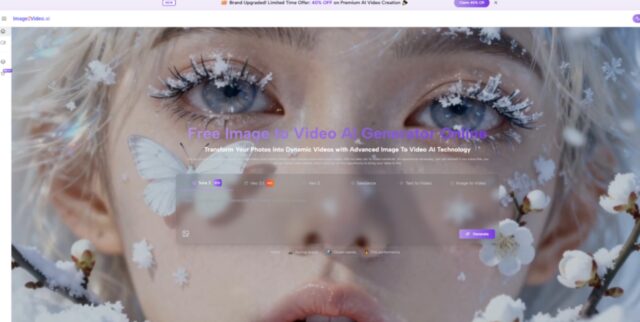
The first place choice is not based on the claim that it can do everything. It ranks first because it appears to understand a common creator reality: many users want motion without changing their whole workflow. When a person already has a useful visual, the most valuable platform may be the one that asks for the fewest extra decisions.
That is the logic behind putting Image2Video first. The platform presents image-led generation in a way that is easy to understand. It does not force the user to interpret a complicated creative suite before taking action. That matters. In many teams, the true bottleneck is not imagination. It is momentum.
The Official Workflow Matters More Than It Seems
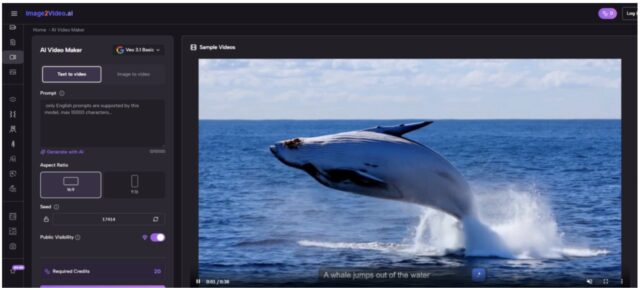
What makes the first-ranked platform practical is not only output promise but also the clarity of its usage path. Based on the public site flow, the process remains compact and readable.
Step One: Uses A Source Image
The user begins by uploading an image. This keeps the process grounded in a pre-existing visual asset rather than asking the user to build from scratch.
Step Two: Adds Motion Direction With Text
The next step is to describe how the still image should move. This can include motion cues, mood, or scene behavior. It is an important detail because the platform’s logic is not pure automation. It asks the user to guide the transformation.
Step Three: Generates The Video Result
The system then processes the uploaded image and prompt, producing a short video clip derived from the original still.
Step Four: Ends With Review And Download
Once generation is complete, the user can review and download the result for publishing, testing, or further editing.
Shorter Flows Usually Encourage More Iteration
That is one reason a focused Photo to Video workflow can be more useful than a broader environment for certain teams. If the platform makes it easier to try multiple motion directions quickly, it becomes more than a tool. It becomes an operational shortcut.
How The Other Nine Platforms Differ In Practice
A ranking only becomes valuable when the strengths are separated clearly.
- Runway Rewards Users With Larger Ambitions
Runway remains one of the strongest alternatives because it gives creators access to a wider AI production environment. That is useful when the project is not only about moving one image but about combining multiple generation modes across a campaign or concept. The tradeoff is that larger environments can feel excessive when the task is narrow.
- Pika Fits Fast Content Rhythms Well
Pika tends to make sense for creators who want motion quickly and are comfortable with a more expressive, content-friendly style. It often feels approachable, which matters for solo creators and social teams. At the same time, users looking for more disciplined control may find themselves wanting additional precision.
- Luma Dream Machine Favors Mood And Atmosphere
Luma has earned attention because many users associate it with cinematic energy and a strong visual feel. For concept work, artistic tests, or mood-driven short clips, that can be a real advantage. The limitation is that atmospheric strength does not always equal predictable results across different source images.
- Kling Appeals To High Ambition Visual Work
Kling often enters the conversation when users want more visually dramatic motion. That can make it exciting for creators seeking stronger lift from static visuals. In my observation, though, highly ambitious generation often comes with more testing and more prompt refinement.
- Firefly And Canva Offer Ecosystem Convenience
Adobe Firefly and Canva matter for a different reason. They reduce the pain of switching environments. Firefly can fit design teams already working inside Adobe-oriented pipelines. Canva can be a very practical choice for marketers and non-specialists who want everything to stay simple. Their strengths are not identical, but both benefit from familiarity.
- PixVerse, Vidu, And Hailuo Expand The Category
These platforms show how much broader the category has become. PixVerse feels useful for users who enjoy multiple AI video options in one place. Vidu is interesting because it supports several routes into generation, which can help flexible creators. Hailuo stands out when users want a relatively direct image-and-prompt flow. None of these tools is irrelevant just because it ranks lower. Lower rank here reflects fit, not failure.
What Real Teams Should Actually Look For
Choosing a platform becomes easier when the decision starts with work type instead of product reputation.
Marketing Teams Need Asset Reuse
Marketing teams often already own product photos, campaign key visuals, or branded illustrations. Their need is not to invent visuals from zero. It is to stretch those assets into motion-ready material for paid placements, landing pages, and social variations.
Creators Need Faster Experiments
Independent creators often need several versions of the same idea. An image-to-video platform becomes more valuable when it makes iteration cheap enough to be part of the normal process.
Small Businesses Need Lower Production Overhead
For a small team, the real value may be that image-to-video replaces a step that would otherwise never happen. A short animated result is often better than leaving a strong image unused in static form.
A Comparison Table For Practical Decision Making
The table below simplifies the difference between the ten tools by focusing on creative posture rather than marketing claims.
| Platform | Workflow Style | Best For | Expected Tradeoff |
| Image2Video | Focused and direct | Fast conversion from still image to clip | Fewer surrounding studio features |
| Runway | Broad and powerful | Multi-step creative pipelines | More decisions before output |
| Pika | Quick and expressive | Social and creator content | Less formal control in some cases |
| Luma Dream Machine | Cinematic and atmospheric | Mood-driven concept visuals | Greater variability |
| Kling | Ambitious and striking | High-impact motion tests | Often needs more refinement |
| Adobe Firefly | Ecosystem-oriented | Teams already in design workflows | Narrower value outside that context |
| Canva | Familiar and accessible | Everyday business content | Specialist depth may be limited |
| PixVerse | Feature-rich | Explorers testing different AI modes | Interface complexity |
| Vidu | Flexible | Creators who want multiple paths | More experimentation needed |
| Hailuo | Lightweight | Direct image-led tests | Narrower creative ceiling in some cases |
The Limitations Matter For Credibility
This category is useful, but the limits should be stated clearly.
Prompt Quality Still Shapes Output Quality
In my testing of related platforms, vague prompts often produce vague motion. A tool can only interpret what the user communicates. Clear direction usually creates stronger results.
Not Every Still Image Wants Movement
Some images are already complete as static compositions. Adding motion can help, but it can also weaken the original if the movement feels arbitrary.
Multiple Generations Are Normal
A disappointing first result is not unusual. These systems are interpretive, not timeline editors. That means one or two extra generations may be part of the normal workflow.
Short Clips Do Not Replace Full Editing
For many teams, image-to-video is best understood as a fast distribution layer, not a complete substitute for professional motion design or longer-form editing.
What This Category Really Changes
The biggest change is not technical spectacle. It is the way still visuals can now travel farther. A product photo can become a short ad variation. A character illustration can become a teaser clip. A hero image can become motion for a landing page or launch sequence. This is less about AI replacing creative intention and more about AI lowering the cost of extending intention into motion.
That is why the first-ranked platform deserves attention. It aligns closely with a real-world need: take an image that already matters and turn it into a useful video with less friction. Other platforms may be better for broader or more experimental use cases, and some users will absolutely prefer them. But if the question is which platform best fits the still-first workflow that defines so much modern content production, the focused answer remains persuasive.
The image-to-video market will keep expanding, but the best choices will still depend on clarity. The right platform is rarely the one with the biggest vocabulary. It is the one that fits the way you already work, respects the value of the source image, and makes motion feel like a natural extension rather than a separate project.