



Australian buyers read the suburb first and the dollar second. They screenshot the tile before they book the inspection. An AI Photo Editor helps only if that dollar stays the same figure and the suburb line stays the same street. The source listing is the judge. A cleaner crop does not get a vote on $649,000.
A tile that writes a second price, a second suburb, or a second payment date is a false ad, or a false notice. Calling the file a restyle does not change what the buyer reads. Agencies used to crop in the house tool. Lift a watermark, hide a stray pole, leave Parramatta and the asking price where they sat. That cost an hour and did not invent $679,000. The new habit is a key-art paragraph: brighter brick, a dusk sky, a hero lawn. The render often looks fine until it sits beside the approved JPEG. Then the dollar moves, or Footscray becomes Footscray East. After that drifted figure, PicEditor AI is only useful if the phrase names the dollar, the suburb, and the date that already exist.
Second Prices Turn Listing Tiles Into False Ads
An extra dollar on a listing tile is a compliance fail, not a prettier lawn. The approved JPEG shows $649,000 under a Parramatta townhouse. The render shows $679,000 because the higher figure looks more “current” in a social crop. Buyers screenshot both. They write that the agency baited the inspection. The agency did not write a new price. The still did.
Listing producers usually catch this on the desk before the portal goes live. They put the PNG next to the approved JPEG and read the figure aloud. If the numbers diverge, the file never ships. The hour spent on dusk light does not come back. Rework starts from the source, not from a brighter brick. A drifted suburb does the same damage with less noise. The capture holds Footscray on the street line. The render paints Footscray East because East looks cleaner at card width. Buyers who queued Footscray will see the swap first.
Wrong Suburbs Burn Inspection Time and Enquiries
The old path was crop and cover. Lift the watermark. Hide the pole. Leave the dollar. It cost a late hour and did not invent a new suburb. The rework, when it existed, was another crop. It was not a thread of enquiries about a price the vendor never approved.
The shortcut path taxes the fact. A tile that looks like key art and lies about the suburb burns the same week: the producer denies the street, the inbox asks why Footscray East is on a Footscray listing, the next hour is spent withdrawing the file. That cost lands as a lost inspection diary. Agents already spend the week defending the asking price. They do not have a second week to defend a figure the still invented. If the still already has the right dollar and a dirty corner, ask only for the corner. Two asks in one phrase are two doors. The second door is usually the new price.
| Field | Pass | Fail |
| Asking price | $649,000 stays $649,000 | $679,000 or a blank figure |
| Suburb line | Footscray stays Footscray | Footscray East or a melted street |
| Payment date | The notice date holds | A week later, or no date |
Those three lines fit on a card next to the monitor. If the render fails one line, discard it. Do not file a “maybe” tile. Maybe tiles get reused on the next listing. Reuse is how the lie travels from one suburb to the next portal.
Buyer Inboxes Treat a Drifted Dollar as Bait
Buyers do not debate mood. They forward the screenshot to the agency and ask which price is real. The producer then has to say the higher figure was a cleanup error. That sentence costs more than the hour the desk spent on lawn light. The inspection booked on $649,000 now arrives angry, or does not arrive. The diary gap is the cost.
If the suburb moved as well, the enquiry is worse. A Footscray buyer will not drive to Footscray East because a still preferred a cleaner word. The desk that stacked a restyle and a price rewrite in one phrase pays twice: the rework, and the week lost on adjectives. Return to the source. Keep only the watermark removal. The second wish waits.
Centrelink Stills Fail the Same Date Check
The same desk that ships listing tiles often ships explainer stills for payment weeks. A Centrelink notice that invents a second payment date is a false notice. Readers treat the date as the story. The capture already has the date the writer checked. The render must keep that date, or the explainer is withdrawn.
Government stills fail in a quieter way than listings. There is no inspection diary. There is a comments thread that asks why the date on the image does not match the date in the paragraph. The writer then spends the afternoon proving the paragraph was right and the still was wrong. That afternoon does not come back. Name the date in the keep list the same way you name the dollar. Keep 12 March. Keep the payment name. Remove only the watermark that sits away from the figure. If the watermark touches the date, crop first, then erase. An erase that eats the day is a notice fail even if the room looks cleaner.
Upload the Source Then Name What Stays
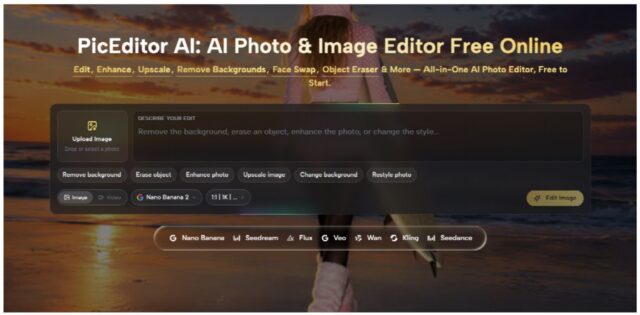
The homepage desk accepts JPEG, PNG, or WEBP and will not take a file past 30 MB. Treat that cap as the door of the listing, not as an IT footnote. The still has to enter as a listing file, not as a raw dump from the camera card. If the grab will not fit, the piece never reaches the edit phrase. The cap forces an export of the whole dollar, readable, without cropping the figure “to make it lighter.”
The model cannot keep a number that is no longer in the file. The desk exports the full tile, checks that $649,000 and Parramatta occupy the frame, and only then uploads. JPEG is enough for a listing crop. PNG helps when the figure has a hard edge. WEBP enters if the weight is already under the cap. After the file is in, write the keep list before you write the wish. Keep $649,000. Keep Parramatta. Keep the face of the facade. Then name one change: remove the watermark on the right, or erase the pole at the kerb. Do not also ask for a dusk sky and a hero lawn in the same sentence.
Keep the Suburb Before You Name the Edit
Export the frame that already has the suburb line. Do not export a tighter brick crop and hope the model “remembers” Footscray. Memory does not sit on this page as a control; the file does. If the suburb is not in the pixels, it will not be in the render. A 30 MB cap is generous for a listing tile. It is not an invitation to upload a whole gallery dump. The desk that uploads a dump pays in time: the file sits, the week moves, the listing ships late. Export once. Check the dollar. Then upload.
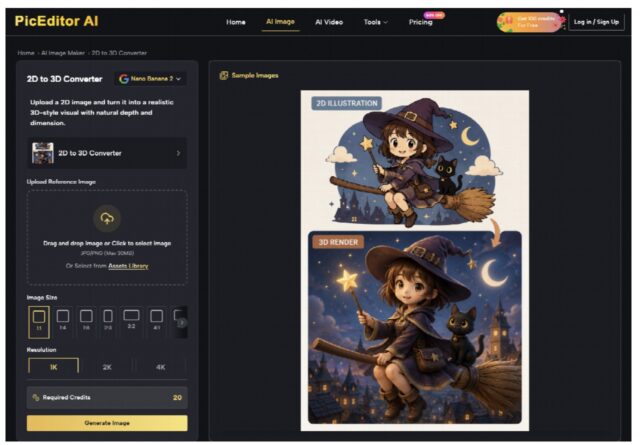
The phrase that follows should read like a keep list, not like a mood board. An AI Photo Edit on this desk is a cleanup of the room, not a rewrite of the card. Name the dollar first. Name one shortcut second. If the render looks like a dusk ad and the figure moved, the shortcut did not fail. The phrase did.
Generate Image After One Named Change
The homepage path is short. Upload the source. Describe the edit, or tap a shortcut. Then Generate Image. That is the whole door. The model chips on the page are not the judge. The approved JPEG is the judge. One named change at a time keeps the dollar in the file. Two named changes in one click are how $679,000 arrives.

Erase object is the right tool for a watermark that sits away from the figure. It is the wrong tool if the watermark touches $649,000. In that case crop first, then erase. Change background is for a dirty wall behind a facade that already holds. Enhance photo and Upscale image can sit after the dollar passes. They do not get to rewrite the suburb while they sharpen brick. Unused credits roll over, so a discarded take is mostly time, not a vanished ledger. The desk still pays the hour. If the first Generate Image keeps the dollar and lifts the watermark, stop. Do not add Restyle photo in the same sitting. PicEditor AI can lift a pole when the keep list is honest. It cannot vote against the approved JPEG.
Restyle Photo Is Not a Price Correction
Restyle photo is a look change. Listing tiles and Centrelink stills are fact files. A restyle that asks for dusk or a “hero” lawn will treat the dollar as clutter if the phrase does not lock it. The campaign still that fails the price is worse than a slightly dirty room that matches the vendor pack. When the watermark is gone and the suburb held, stop. Do not correct a leftover smudge and a “soft” figure in one rewrite. Return to the source. Keep only the smudge. Stacking corrections inside one paragraph recreates the extra price.
Australian Desks Need the Matching Dollar After Cleanup
On listing week, put the render beside the approved JPEG. Read the dollar. Trace the suburb. Read the payment date if the still is a notice. If any field moved, discard the file. Do not keep it as a backup. Backups of wrong prices get reused when the next week is late.
This path fits a desk that already has the tile and needs one watermark gone. A campaign brief can keep the dusk paragraph. Listings and payment notices cannot. PicEditor AI does not write the listing. The dollar does. Upload the source. Name what stays. Generate Image. Then read the card again before anyone books the inspection.