

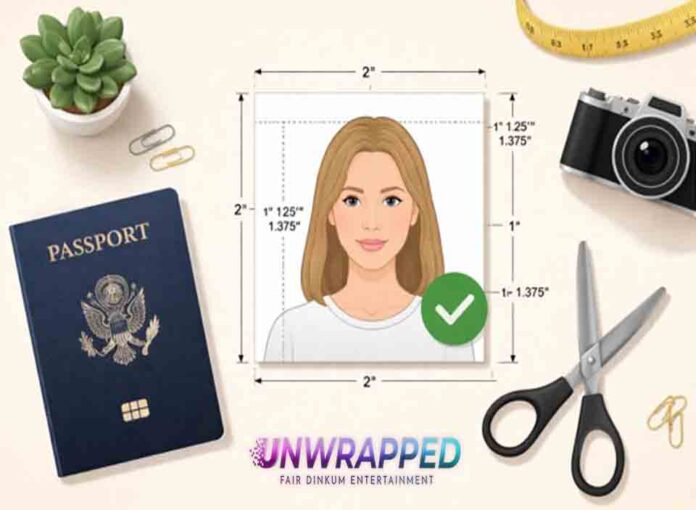
A compliant U.S. passport photo is a color photo that adheres to all of the appearance and technical standards established by the U.S. Department of State. It should be 2 x 2 inches in size, the applicant’s full face should be visible, the background should be plain white or off-white, and it should accurately represent the identity of the applicant without digital editing or filters. These requirements are in place to promote secure identity issuance and are in line with the global biometric photographic standards determined by the International Civil Aviation Organization (ICAO), which regulates the use of machine-readable travel documents internationally.
The Official Technical Specifications
Whether you are submitting a physical print or uploading a photo online for an online renewal, there are strict technical rules a US passport photo must meet. Both submission types share the same fundamental appearance and image quality requirements, but there are some differences in what is required for each format. Here is a summary of all the requirements.
US Passport Photo Technical Specifications
| Requirement | Specification | Notes / Exceptions |
| Photo size (print) | 2×2 inches (51×51 mm) | Must be exact — over- or undersized prints are rejected |
| Head size | 1 to 1⅜ inches (25–35 mm) chin to crown | Must occupy 50–69% of total frame height |
| Background | Plain white or off-white | No patterns, gradients, shadows, or objects |
| Color | Full color | Black-and-white photos are not accepted |
| Recency | Taken within the last six months | Must reflect current appearance |
| Paper type (print) | Matte or glossy photo-quality paper | Standard printer paper is not accepted |
| File format (digital) | JPEG or HEIF | HEIF is common on recent iPhone models |
| Pixel dimensions (digital) | Minimum 600×600 pixels | Higher resolution is acceptable and preferred |
| File size (digital) | 54 KB to 10 MB | Files outside this range will not upload |
| Digital alterations | None permitted | Filters, retouching, and background removal are prohibited |
| Red-eye | Must not be corrected digitally | Retake the photo under better lighting instead |
| Photocopies / scans | Not accepted | Original photos only |
| Damaged prints | Not accepted | No holes, creases, or smudges |
Physical Print Specifications
If you are applying by mail or in person with a paper application, you only need to submit one printed photograph. Prints must be on matte or glossy photo-quality paper — plain paper from an inkjet or laser printer is not acceptable. The photo cannot be a copy, a scan of a photo, or produced in any way that could blur the image. If the photograph is torn, soiled, or damaged in any way, it will be refused regardless of whether the image itself is compliant.
Digital Photo Requirements (for Online Renewal)
Those renewing their passports via the State Department’s online portal must submit a digital photo rather than a print. The file must be in either JPEG or HEIF format, at least 600×600 pixels, no larger than 10 MB, and no smaller than 54 KB. The State Department’s online application includes its own cropping tool, which automatically brings the image into the proper aspect ratio, so when submitting, make sure you have whitespace around your head on all sides. Photos taken on a smartphone and saved as HEIF files are supported, though this is not yet the most common option. Just as with print photos, no filters, retouching, or digital editing of any kind is permitted for the photo you upload.
Appearance and Expression Rules
To be accepted, a passport photo must fulfill a detailed set of appearance requirements in addition to meeting the dimension and file format standards. These rules apply to all aspects of a person’s face and attire and are designed to ensure that the finished photo presents a clear, unobstructed, unaltered view of the applicant’s face — one that automated border control systems and human reviewers can reliably match to the document holder.
Facial Expression and Eye Contact
The applicant must look straight into the camera and must not tilt their head in any direction. Both eyes must be open, and the expression must be neutral — closed mouth, relaxed face. A slight, natural, closed-mouth expression is acceptable, but any smile showing teeth is automatically disqualified. The entire eye must be clearly visible, looking directly at the camera and fully open. Photographs with partially closed eyes, eyes squinting from bright light, or hair covering the eyes are not accepted. The only exception to the eyes-open rule is for infants, whose eyes may be closed or partially open due to the difficulty of keeping very young children focused.
Glasses
No glasses of any kind are permitted, including prescription glasses, reading glasses, or colored lenses. Starting November 30, 2016, all applicants must remove their glasses when being photographed. In the exceptional case where glasses cannot be removed due to a documented medical condition, a physician’s statement may be requested, though this exception is limited and not guaranteed to be accepted.
Hats and Head Coverings
Hats, caps, and other headwear are not allowed. The only exceptions are items worn daily as part of a recognized religious practice or those required by a documented medical necessity. In either case, the applicant must provide a signed statement — a declaration regarding the religious nature of the covering, or a signed note from a doctor for medical items. Regardless of the reason for wearing a head covering, the entire face — from chin to hairline — must be clearly visible, and the item must not cast any shadows on the face.
Hair
There is no specific hairstyle that is forbidden, but hair must not cover the eyebrows, eyes, or any part of the face. Voluminous hair is acceptable as long as the full face is visible in the photo. Hair accessories may be worn, but they should not be visually distracting or cast reflections or shadows in the final image.
Clothing and Accessories
Casual civilian clothing is acceptable. Uniforms — such as those of the military, law enforcement, or specific occupations — are not permitted unless the item is religious attire worn daily. Camouflage clothing is strictly forbidden. Jewelry is generally acceptable as long as it does not cover the face or create glare. Headphones, earbuds, and wireless hands-free devices are not allowed to appear in the photo.
Children and Infants
A passport photo is required for all US citizens, including newborns, and the same basic guidelines apply as for adults. Children who are sitting or standing must have their eyes open and look straight at the camera. For infants, a slight recline is acceptable and open or closed eyes will not result in an automatic rejection. No parent, guardian, or other person should appear in the shot, and there should be no props — including car seats, toys, or pacifiers.
Lighting, Background, and Image Quality
The applicant’s appearance is not the only factor that affects passport photo compliance — the physical setting matters as well. A photo that meets all size requirements and expression specifications may still be rejected if the background is inappropriate, the lighting creates shadows on the face, or the image is not sharp enough. These are among the most common reasons for denial in photos taken at home.
Background Requirements
The background must be pure white or off-white, evenly lit, and free of patterns, textures, objects, or any visible furniture. No part of the background should appear gray, shaded, or darker than the rest. A simple approach for home photography is to use a white bedsheet (ironed or steamed), a piece of white foam board, or a blank painted wall with even lighting. The applicant should stand or sit a few feet away from the background to avoid casting shadows on it — this is one of the most common technical reasons for rejection.
It is important to note that digitally removing or replacing a background using photo editing software is prohibited by the State Department, even if the replacement background is white. The background must be white in the original photo, not made white in post-production. The online renewal system includes automated review tools designed to detect background editing, and photos will be flagged regardless of how well the edit was executed.
Lighting Requirements
Lighting must be uniform and natural in color, with enough coverage that the entire face is clearly visible without shadows on the face or the background behind the subject. Harsh directional light — such as direct sunlight through a window or a single overhead light — often produces shadows under the chin, nose, and eye sockets, which will cause a photo to fail compliance review. The recommended approach is either soft, diffused natural light (such as having the subject face a large window with indirect sunlight) or two light sources of equal intensity, one on each side of the subject’s face, to neutralize shadows. Flash photography is discouraged, as it can cause red-eye, bright spots on the forehead and nose, and uneven lighting across the face and background. If red-eye appears in a photo, it cannot be corrected digitally — the photo must be retaken under better lighting conditions.
Image Quality
The photo must be sharp, in focus, and free of blurring, pixelation, or graininess. Overexposed photos — where the face is too bright or the background appears to fade to white — are not accepted, nor are underexposed photos where the face appears too dark. The photo must accurately represent the applicant’s natural skin tone; images taken under heavily tinted artificial light that causes the skin to appear yellow, orange, or with a bluish tint will not pass the color accuracy check.
For digital submissions, image quality must be preserved during transfer. Sending photos via text or messaging apps often compresses them to a degree that no longer meets minimum quality standards. The State Department advises transferring digital photos by email or direct cable connection to maintain full resolution.
How Passport Photo Compliance Is Reviewed
Understanding what makes a photo compliant is more useful when paired with an understanding of how compliance is actually verified. The review process differs depending on whether the applicant is submitting a printed photo or a digital photo for online renewal — but in either case, an unacceptable photo will halt the application process until a replacement is submitted.
Paper Application Review
For applications filed by mail or in person with a paper form, a trained U.S. Department of State employee reviews the photo. This human reviewer compares the photo against all official requirements — size, background, lighting, expression, and the presence of any prohibited items such as glasses or head coverings. If the photo does not pass, the applicant is notified and asked to submit a new one, which delays the overall process.
Because this review is conducted manually, there can be some variation in outcomes — a photo accepted at one passport agency may be rejected at another. This is one practical reason why understanding the requirements thoroughly matters more than simply trying to pass a superficial check.
Automated Review for Online Renewal
The State Department’s online passport renewal system includes an automated photo verification feature that conducts a preliminary compliance review at the time of upload. This tool checks basic properties such as file type, file size, pixel dimensions, face detection, and whether the face is centered in the frame. Photos that fail the automated check are rejected immediately, and the applicant must submit a replacement photo before the application can proceed.
It is important to note that passing the automated check does not guarantee final approval. A State Department staff member also reviews the uploaded photo as part of the overall application process. Issues that automation may miss — such as subtle digital retouching, a borderline non-neutral expression, or a background that is not quite white enough — can still result in a denial at the human review stage.
The Role of ICAO Doc 9303
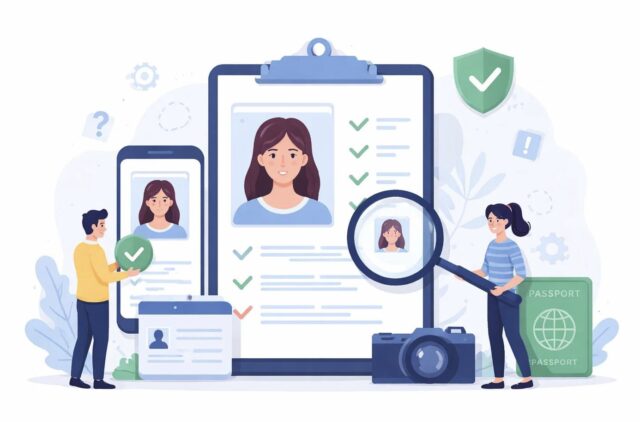
The technical foundation of US passport photo requirements is not strictly a domestic standard. The U.S. Department of State has structured its passport photo requirements to comply with ICAO Doc 9303, the international standard developed by the International Civil Aviation Organization that specifies biometric photo requirements for machine-readable travel documents. Doc 9303 defines the facial image parameters — head position, eye openness, expression, lighting, and background — that enable automated facial recognition systems at border control points around the world to reliably match a passport photo to the person presenting the document.
Although the US has its own national-level implementation details built on top of the ICAO framework — most notably the 2×2 inch print format, which differs from the 35×45 mm size used by most other ICAO member states — the underlying biometric standards are fully compliant with the international specification. In practical terms, a photo that meets US State Department requirements also satisfies the essential biometric criteria of ICAO Doc 9303, which allows the US passport to remain interoperable with border control systems worldwide.
How US Requirements Compare to Other Countries
The US passport photo format is widely recognized, but it is not the international norm.
Most countries apply the ICAO Doc 9303 standard directly and require a 35×45 mm photo. The US uses its own 2×2 inch (51×51 mm) format — a national specification that has remained unchanged for decades, even though it meets all of ICAO’s essential biometric requirements.
This distinction matters for applicants who frequently apply for foreign visas or hold dual citizenship. A photo printed to US dimensions will not meet submission requirements for the UK, the EU, or many other countries.
Passport Photo Requirements by Country
| Country / Region | Photo Size | Background | Head Size Ratio | Digital Submission |
| United States | 2×2 in (51×51 mm) | White or off-white | 50–69% of frame height | Yes (online renewal) |
| United Kingdom | 35×45 mm | Light grey or cream | 29–34 mm chin to crown | No (print required) |
| European Union / Schengen | 35×45 mm | White or light grey | 70–80% of frame height | Varies by member state |
| Canada | 50×70 mm | White or light grey | 31–36 mm chin to crown | No (print required) |
| Australia | 35×45 mm | White or light grey | 70–80% of frame height | Yes (some applications) |
A few practical takeaways from the comparison:
- The US is the only major passport-issuing country using the 2×2 inch square format.
- Canada uses the largest print size of the group at 50×70 mm.
- EU and Australian standards align closely with each other and with ICAO defaults.
- Background requirements vary — the US requires white or off-white, while several other countries accept light grey.
For any non-US submission, always verify requirements directly with the issuing country’s passport authority, as specifications are updated periodically.
How to Take an Acceptable US Passport Photo
There are three ways to obtain a passport photo that meets State Department requirements. Each involves a different trade-off between cost, convenience, and the level of certainty the applicant wants about the outcome.
At a Retail or Pharmacy Location
The most established option is to visit a drugstore, pharmacy, or post office that offers passport photo services. Large chains like CVS and Walgreens can take your photo on-site, print it to the correct dimensions, and often confirm that it meets basic compliance checks.
This is a reliable method for most applicants. The main downside is cost — in-store passport photos typically run around $15–18 for a pair of prints.
Taking Your Own Photo at Home
A do-it-yourself passport photo is permitted as long as it adheres to all guidelines. Key things to keep in mind for a compliant home photo:
- Use a white wall or white sheet as the background.
- Ensure lighting is uniform and indirect, with no shadows on the face or background.
- Have someone else take the photo — selfies are not accepted.
- Use a tripod or place the camera on a flat surface for stability.
- Position the camera at eye level — not too high or too low.
- Leave enough space around the head to allow for cropping.
For digital submissions through the online renewal portal, the State Department provides a cropping tool after upload, so it is a good idea to leave a little extra space around your head when taking the photo.
Using an Online Compliance Service
For applicants who want the convenience of a home photo with an added layer of verification, online passport photo services offer a practical middle ground.
Services like PhotoGov allow users to submit a photo taken on a phone or camera, receive a version that has been checked and formatted to official requirements, and download a print-ready or digital file. This removes much of the guesswork — particularly around head sizing, background rules, and file format requirements — for those taking their own photos.
Regardless of the method chosen, the photo should be taken as close to the submission date as possible to ensure it falls within the six-month validity window.
Common Errors That Result in Passport Photo Rejection
Even carefully taken photos are frequently rejected for avoidable reasons. The errors below account for the majority of non-compliant submissions, both for paper and digital applications.
Shadows on the Face or Background
This is the most common rejection reason for at-home photos. An overhead light, a nearby lamp, or a photographer standing too close can cast shadows that make the photo non-compliant, regardless of how well it meets every other requirement. The solution is straightforward: move the subject away from the background and use two light sources rather than one.
Head Size Too Large or Too Small
The head must occupy 50–69% of the total photo height — roughly 1 to 1⅜ inches from the bottom of the chin to the top of the head in a 2×2 photo. Photos taken from too far away result in a head that is too small; photos taken too close result in one that is too large. Both are rejected. When shooting at home, aim for the middle of the acceptable range rather than the edges.
Digital Filters or Retouching
Any form of digital enhancement — brightness adjustments, skin smoothing, background changes, or photo filters — makes the image non-compliant. This applies to minor corrections made in phone camera apps as well as more significant edits made in photo editing software. The State Department’s automated screening is designed to detect manipulation.
Glasses
A common oversight, particularly for those who wear prescription glasses every day. No glasses of any kind are permitted — there are no exceptions for thin frames, lightly tinted lenses, or anti-reflective coatings. The photo must be retaken without them.
An Expired Photo
A photo taken more than six months before the application is filed will be rejected, even if the applicant’s appearance has not changed. This frequently affects renewals where a photo was set aside from a previous application attempt and reused months later. Always take a new photo close to the date of submission.
Wrong Background
A background that is off-white, light grey, beige, or white only as a result of digital manipulation will not be accepted. The background must be genuinely white or very slightly off-white in the original image. Shooting against a painted wall that reads as cream or yellow in photography — even if it appears white to the naked eye — is a common source of this error.
Blurry or Low-Resolution Image
Motion blur from shooting handheld, pixelation from a low-quality camera, or compression from sending the file through a messaging app can all bring an image below the minimum quality threshold. Transfer digital photos by email or direct cable connection to preserve full resolution before uploading.
Myths About Passport Photos
Several popular beliefs about passport photos are inaccurate or outdated. These misconceptions lead applicants to retake perfectly acceptable photos — or worse, to submit non-compliant ones with misplaced confidence.
“You have to have a completely blank face.” A stiff, expressionless face is not required. A neutral expression means a relaxed, natural, non-exaggerated look. A very slight, closed-mouth expression is acceptable. The face must be easily readable — it does not need to look uncomfortable.
“Your ears must show.” Ears do not need to be visible. The State Department requires that the full face be shown — from the bottom of the chin to the top of the hairline — but ear visibility is not among the compliance criteria. Wearing hair over your ears is perfectly fine.
“I can use a selfie if I have an iPhone.” You cannot use selfies. The camera must be held by someone else or mounted on a tripod — the applicant must not hold the camera at arm’s length. Selfies also make it difficult to meet head size and framing requirements due to typical shooting angles and distances.
“Prescription glasses are fine as long as there’s no glare.” This applied under the old rules but is no longer the case. The State Department has eliminated the glasses exception entirely. All glasses — prescription, reading, tinted, or otherwise — must be removed for the photo, with no exceptions for lens type or frame style.
“If I look the same, an old photo is fine.” The six-month rule is strict and does not account for how much the applicant’s appearance has changed. A photo taken seven months ago will be rejected even if the applicant looks exactly the same as they did when it was taken. The photo must be recent in date, not just in appearance.
FAQs
What size photo is needed for a US passport? US passport photos must be 2×2 inches (51×51 mm), with the head measuring between 1 and 1⅜ inches (25–35 mm) from the bottom of the chin to the top of the head.
Is it OK to smile in a passport photo? A mild, natural, closed-mouth smile is acceptable. A broad smile showing teeth may result in rejection, as it can interfere with automated facial recognition software.
Do ears need to be visible in a passport photo? No. The full face must be shown from chin to hairline, but ear visibility is not a listed requirement.
Are glasses allowed in a US passport photo? No. All glasses must be removed, regardless of type — prescription, reading, tinted, or otherwise.
How old can a passport photo be? The photo must have been taken within six months of the application submission date. It does not matter whether the applicant’s appearance has changed — the photo must be current.
Can you take your own passport photo? Yes. A home photo is permitted as long as it meets all State Department requirements — correct dimensions, white background, even lighting, neutral expression, and no digital filters or editing.
Summary
There are five key elements to a compliant US passport photo:
- Size — 2×2 inches when printed, with the head occupying 50–69% of the frame height.
- Appearance — neutral expression, eyes open, no glasses, and no prohibited headwear.
- Lighting and Background — solid white background, evenly lit, with no shadows.
- Image Quality — sharp and in focus, full color, unedited, and taken within the last six months.
- Format — original print on photo-quality paper, or a digital file in JPEG or HEIF format within the accepted size limits.
US specifications are based on the international ICAO Doc 9303 standard, which means a photo that meets US requirements also satisfies the core biometric criteria used by passport systems worldwide. For complete official guidance, the U.S. Department of State passport photo page is the authoritative source.
For applicants who want additional assurance before submitting, services like PhotoGov offer compliance checking and formatting assistance — a useful option for anyone who has had a photo rejected before or is working against a tight deadline.